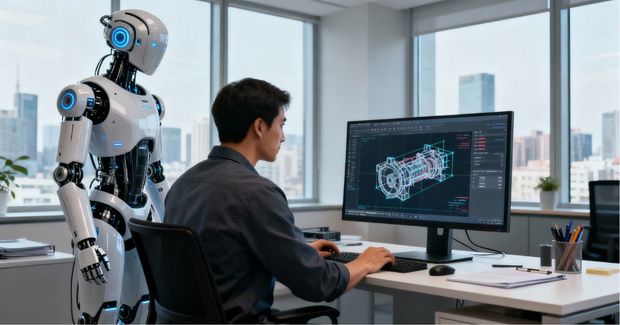
Mechanical engineering workflows are changing faster than most teams expected. AI isn’t replacing design expertise, but it is reshaping the first hour of every model: the cleanup, the decisions, the iteration. This article explores what that shift means in real CAD practice.
A Changing Rhythm in Everyday Design Work
I realised something had shifted on a quiet Friday afternoon. I had spent the day wrestling with a housing model that had passed through more hands than I could count. Out of curiosity, I asked the AI assistant inside my CAD system to check the fillet groups for inconsistencies. Part of me expected hesitation or a misread of the geometry. Instead, it pointed straight at a problem area I had overlooked and proposed a cleaner propagation that aligned with the original intent. It was the sort of moment that makes you lean back and admit it genuinely helped.
What struck me was not the accuracy. It was the time I no longer had to spend tidying a tedious corner of the model. If you design mechanical parts for a living, you know exactly how many minutes vanish into tasks like that. They rarely require deep thought, yet they erode hours all the same. A good portion of that loss comes from how the models are built. When feature trees are inconsistent or intent is fuzzy, even simple edits feel clumsy. That is why teams put so much effort into modelling standards and parametric discipline.
AI is now appearing right in the middle of that long-standing conversation. You can see the shift in tone across the industry as well. Siemens, for example, describes this moment as one where AI is beginning to restructure product development workflows rather than simply accelerating them, a theme reinforced throughout their recent thought-leadership reports.
Why AI Copilots Matter Now
Most engineers I speak with feel the growing pressure. Development cycles shrink. Iterations stack earlier than they once did. Simulation requirements rise. Manufacturers expect models that are robust, fully constrained and ready for downstream tooling without a round of repair work. At the same time, we are still dealing with imports, rebuild warnings, boundary conditions and the usual noise of day-to-day design.
The idea of an AI copilot resonates because it does not try to design a product for you. It helps you spend more time thinking and less time repairing. In many ways it targets the same inefficiencies tackled by workflow improvement projects, only it works from inside the tools you already trust.
It may feel like AI only just entered the scene, but it’s already been three years since ChatGPT was publicly launched. At this point, it seems clear that I either need to embrace it or risk becoming less efficient in my job, along with everything that comes with that. We’re all aware of the massive layoffs happening in some industries already. And while mechanical engineering appears to be more insulated, the performance standards are certainly being pushed to the limit. See how much companies like Autodesk, Dassault Systèmes, Siemens, and others have already accomplished in the table below.
This timeline highlights how AI has steadily moved from basic modelling helpers to full copilots across mainstream CAD platforms.
| Year | Month | Vendor | Feature | Description |
|---|---|---|---|---|
| 2022 | May | Autodesk | AI Modelling Assistance (AutoCAD) | Early AI-based modelling tools arrive in AutoCAD to accelerate parametric workflows. |
| 2022 | August | Dassault Systèmes / SOLIDWORKS | AI Design Assistance | AI-driven helpers begin optimising part geometry inside SOLIDWORKS. |
| 2022 | October | Autodesk | Sketch Assist (Fusion 360) | Fusion 360 introduces AI suggestions for sketch creation in early builds. |
| 2023 | March | Siemens NX | AI Feature Recognition | NX adds AI-powered detection and tagging for geometry and imported features. |
| 2023 | June | Siemens NX | Enhanced Import Intelligence | AI improves recognition of STEP features for cleaner, editable models. |
| 2023 | November | Autodesk | Automated Mesh Insights (Fusion 360) | Fusion 360 Simulation gains AI assistance for mesh quality and setup decisions. |
| 2024 | March | Leo AI | AI Copilot Beta | First public beta of an engineering-focused AI copilot for CAD workflows. |
| 2024 | July | Dassault Systèmes / SOLIDWORKS | AI Mate Proposals | SOLIDWORKS suggests mates and constraints automatically in assemblies. |
| 2024 | September | Siemens NX | Load Case Prediction | NX Simulation introduces AI-supported load case suggestions. |
| 2025 | April | IMSI TurboCAD | Copilot Professional | TurboCAD launches an AI plug-in for scene analysis and parametric part creation. |
| 2025 | August | Leo AI | CAD-aware Part Search | Leo AI connects to PLM and catalog data for AI-driven component sourcing. |
| 2025 | September | Autodesk | Neural CAD for Fusion/Forma | Text-driven geometry creation and enhanced rendering powered by neural models. |
| 2025 | September | Leo AI | Assembly Troubleshooting | Step-by-step AI guidance to diagnose and fix assembly issues. |
| 2025 | October | PTC Onshape | Onshape AI Advisor | Real-time model guidance and workflow optimisation in the browser CAD environment. |
| 2025 | October | Leo AI | Geometry-based Part Matching | AI finds compatible replacement parts based on geometry and constraints. |
| 2025 | November | Tech Soft 3D | HOOPS AI | Framework for CAD developers to embed machine-learning-driven engineering workflows. |
| 2025 | November | Dassault Systèmes / SOLIDWORKS | AURA AI Companion | SOLIDWORKS debuts AURA, a next-generation AI design companion with integrated generative tools. |
What an AI Copilot Really Is
The term “AI copilot” gets used so broadly that it helps to ground it in reality. In a mechanical design context it is not a generic chatbot floating above your CAD interface, it is a blend of geometry interpretation, constraint logic, pattern recognition and conversational querying that operates inside the modelling environment. AI copilot can read a rough sketch and propose constraints that match common design logic. It can analyse a messy STEP file and reconstruct a usable feature structure. It can summarise differences between assembly revisions. It can scan a simulation setup and infer missing loads or restraints. It acts like a guide that nudges those foundations based on the intent it thinks you had.
This aligns strongly with Siemens’ own definition of AI in product development, where they emphasise that AI’s value lies in amplifying human expertise rather than replacing it — a point echoed repeatedly in their AI in Product Development series.
Where AI Fits Into the Real Workflow
Anyone who has worked in a busy design office knows the moments where an extra pair of hands would be welcome. A junior engineer might be cleaning supplier geometry, untangling a sketch that refuses to settle, preparing a simulation that hinges on a dozen boundary conditions or even generating the first draft of a drawing pack on a tight deadline.
One of the more useful developments is Fusion 360’s new Sketch Auto-Constrain feature.
[embed]https://youtu.be/SBmDZuFTIAo?si=9EjFr-mRUOxjIDM5[/embed]
At a broader level, Siemens notes that organisations already using AI meaningfully in their workflows — the so-called “Top Performers” — are twice as likely to apply AI during concept development and early design decisions. Their analysis shows that these teams see reduced manual work, improved decision-making and shorter iteration cycles, reinforcing many of the same benefits that practising engineers experience within day-to-day CAD work.
SOLIDWORKS continues to integrate intelligence that picks up on sketch intent and automates repetitive detailing, often previewed during their annual SOLIDWORKS Live sessions. Autodesk’s own engineering teams describe how the AI system evaluates a rough sketch and applies constraints that align with typical mechanical design intent, reducing the fumbling that often slows early geometry creation. It is not perfect, but when it works, it removes a surprising amount of friction in the first few minutes of part definition.
A Few Real Advantages
One of the unexpected strengths of AI copilots is their ability to support concept exploration. With a baseline sketch and a handful of constraints, the system can generate early variations that help you compare stiffness, weight or manufacturability.
Simulation benefits as well. A copilot might highlight surfaces that should share a boundary, or propose a more efficient mesh strategy. Sometimes it catches an unrestrained degree of freedom before you do. Documentation is another practical win. The relief of having a first-pass drawing generated automatically is hard to dismiss. Even when refinement is needed, starting from something instead of a blank sheet saves momentum. PTC’s ongoing work on Onshape AI tools shows how browser-based CAD is tapping into this benefit.
Autodesk has started taking this even further with automated drawing generation inside Fusion 360. Their recent update on AI-driven manufacturing workflows outlines how the system can now interpret a model, create a structured drawing view set and apply basic documentation automatically. The approach is still evolving, but the direction is clear, and Autodesk’s own announcement highlights how these automated drawings are becoming a practical time-saver rather than a novelty.
[embed]https://youtu.be/F8rGEOcY554?si=kG6A7WOdXdhirz4q[/embed]
Siemens’ Simcenter team has demonstrated similar value on the analysis side, showing in their AI-accelerated gear stress analysis example how learning-based models can cut simulation time from hours to minutes. It is not a replacement for high-fidelity solvers, but it gives engineers faster feedback earlier in the design timeline.
The Limitations You Should Expect
None of this is perfect. AI still struggles when intent is ambiguous. Loose sketches, clashing constraints or missing references can lead to confident but unhelpful suggestions. Old assemblies built over many years tend to confuse most systems, especially when they contain a patchwork of modelling strategies.
Every engineer I speak with has a story about a hallucinated suggestion that made sense at first glance and fell apart on inspection. Concerns around data privacy remain active as well. Vendors emphasise their controls, and you can see their positions in Autodesk’s Trust & Security resources or Siemens’ Digital Trust documentation.
Even so, it is reasonable to ask where model-derived insights go. Siemens’ two-part series on ethical AI (Part 1 / Part 2) emphasises this point strongly. Their guidance centres on balancing innovation with trust, ensuring that AI models are reliable, explainable and aligned with organisational safety requirements — a perspective mechanical engineers increasingly need to understand as AI becomes more embedded in professional tools.
The Skill Shift for Modern Engineers
Even with the limitations, something important is changing. Engineers who learn how to use AI effectively will naturally move faster and explore more ideas. It is not about clever prompts. It is about communicating intent. If you want a sketch cleaned up, you need to tell the system what matters. If you want a concept variant, you must offer the constraints that actually define success. The closest comparison is mentoring a junior engineer. Vague guidance produces vague results. Clear thinking produces clear output. That is as true for a digital assistant as it is for a human colleague.
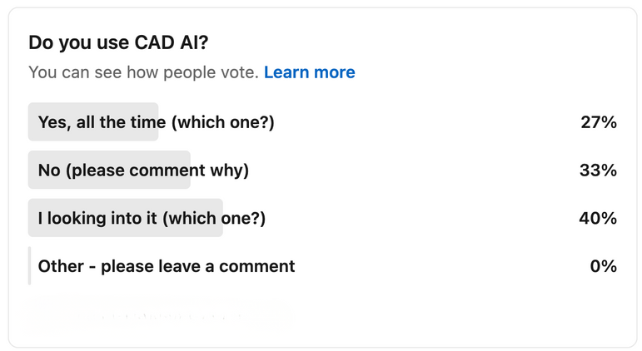
To get a clearer picture of how mechanical engineers are actually approaching AI, we recently ran a survey in our LinkedIn community. There’s still time to cast your vote — you can add your voice here. Early responses have already highlighted engineers using AI inside tools like Autodesk Inventor and platforms such as Zoo.dev, with many more exploring their options.
Where AI Copilots Are Headed
Looking ahead, several ideas are gathering momentum. Some developers are exploring AI-native modelling kernels that bring geometry, optimisation and manufacturability into a single decision space. Others are experimenting with background optimisation loops that react to sketches and constraints as you work. Siemens has hinted at this direction through its generative engineering initiatives, which point toward a more integrated design environment.
Multi-physics awareness is another compelling thread. Imagine sketching a concept and having the system quietly evaluate structural and thermal implications in the background. It will not replace detailed simulation, but it could make early decisions far better informed and reduce the back-and-forth that often dominates concept development.
Manufacturing workflows are seeing the same shift. Autodesk has begun introducing AI-assisted toolpath optimisation in Fusion 360, where the system evaluates geometry, machining intent and stock conditions to propose more efficient strategies. It is early, but the intention is clear. Toolpaths that once required repeated manual iteration are gradually becoming guided, with learning-based models nudging you toward sensible decisions.
Another emerging line of development comes from supply-chain awareness. Partnerships with organisations such as Avnet hint at a future where AI copilots go beyond modelling and simulation. They reach into component availability, lead times and sourcing constraints. Even at this early stage, you can see the potential for workflows where design intent and real-world supply conditions inform one another far earlier in the process.
We are not there yet. But for the first time the path is visible, and anyone tracking CAD and manufacturing software can sense the direction of travel.
[embed]https://youtu.be/puJJ4P5e0tY?si=NZNxTt-rdhyDe2vs[/embed]
Industry Insights: AI Adoption, Challenges and Best Practices
Much of what we are seeing inside CAD mirrors the broader shift happening across product development. SOLIDWORKS’ recent “State of Product Development” eBook highlights that 72% of companies see the biggest AI potential in generative design and early-stage ideation, while 55% point to machine-learning-driven forecasting. Digital twin simulation, NLP-powered summarisation and computer vision all sit just behind those leaders.
Their research also shows that “Top Performers” — organisations with advanced engineering maturity — are nearly twice as likely to be actively using AI today compared to others (43% vs 22%). Meanwhile, 45% of all respondents report that they have only just begun experimenting with AI in a structured way.
The same report reinforces several major barriers, including inadequate training data, cultural resistance and weak internal governance. Their advice is consistent: start small, pilot use cases, build trust gradually and focus on practical problems rather than sweeping transformations.
This message is echoed in Siemens’ engineering content, including their 2025 manufacturing copilot showcase, which demonstrates how AI-assisted workflows can be applied not only inside CAD but across production, inspection and packaging processes. The thread running through all of these resources is simple: AI succeeds when it lifts the engineer, not when it tries to replace one.
For readers who want a concise, visual summary of this shift, the Siemens product-development video (below) is an excellent primer. It captures the momentum across concept design, simulation and manufacturing in a way that complements the day-to-day examples described throughout this article.
[embed]https://youtu.be/evt4JYdWFEw?si=GKtt_R5g7CzB-qYQ[/embed]
The Closing Thought
When I think back to that Friday afternoon, the moment still feels small but telling. It was not a breakthrough. It was not even particularly clever. It simply showed that the tools we use are finally starting to shoulder some of the everyday load. Not by designing for us, but by smoothing the edges of the work.
If you work in CAD every day, this is a good moment to experiment. See how these tools behave. Notice where they help and where they overreach. Learn how to steer them. As the technology matures, your ability to work alongside it will become a natural extension of your engineering intuition.
Artificial intelligence will not replace mechanical engineers. It will change how we spend our time, and if we are fortunate, it will free more of that time for the work that genuinely feels like engineering.